Single Board Computing
Raspberry Pi 5 - The Credit Card Computer That Can Do Almost Anything
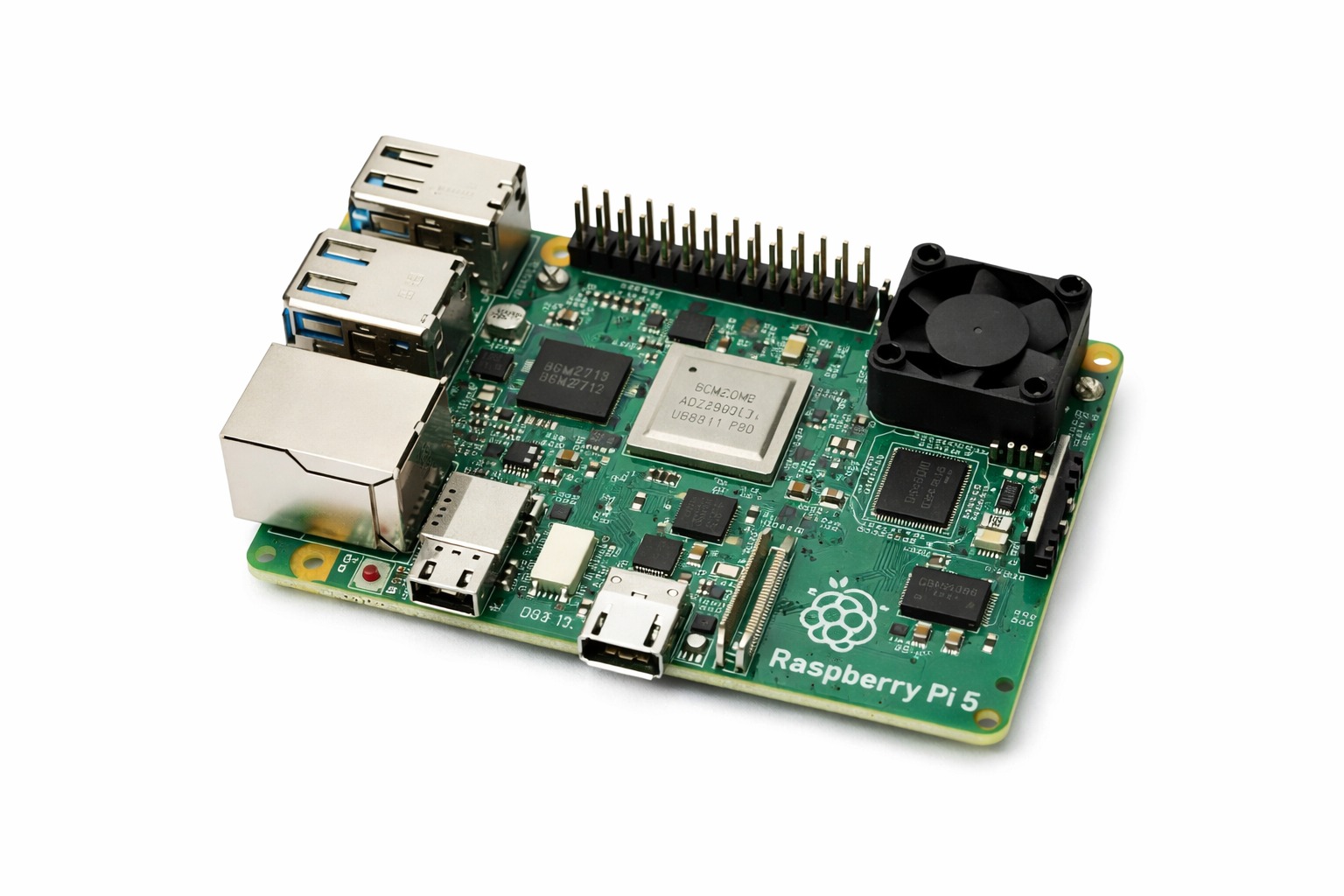
Raspberry Pi 5 delivers full Linux computing, strong performance, modern I/O, and GPIO control in a credit-card-sized platform.
Full Article
Every once in a while, a piece of technology comes along that makes you rethink what is possible at a given price point. The Raspberry Pi was that technology in 2012, and the Raspberry Pi 5 - released in late 2023 - has done it again. For around $60 to $80, you get a fully functional quad-core ARM computer running at 2.4 GHz with up to 8 GB of RAM, built-in Wi-Fi and Bluetooth, gigabit Ethernet, USB 3.0 ports, two 4K HDMI outputs, a PCIe interface for NVMe SSDs, and a 40-pin GPIO header for hardware projects. It runs full Linux. It has a desktop. It runs Python, Node.js, Docker, and a web browser. It is, without exaggeration, a real computer - just the size of a credit card. Let's Be Clear About What It Is The most important thing to understand about the Raspberry Pi is that it is not a microcontroller like the Arduino Uno or ESP32. Those boards run a single program directly, have no operating system, start instantly when powered on, and interact with hardware through simple pin manipulation. The Raspberry Pi runs a complete Linux operating system - Raspberry Pi OS (based on Debian), Ubuntu, Kali, or dozens of others. It boots from a microSD card (or NVMe SSD), loads dozens of background processes, presents a desktop GUI, and runs multiple applications simultaneously. This distinction matters enormously when choosing which platform is right for your project. The BCM2712 SoC - What Makes the Pi 5 Fast The performance jump from Pi 4 to Pi 5 is substantial. The new Broadcom BCM2712 chip features four ARM Cortex-A76 cores - the same CPU architecture used in mid-range flagship smartphones from 2020. Each core runs at 2.4 GHz. In practical benchmarks, the Pi 5 is roughly 2 to 3 times faster than the Pi 4 for CPU-bound tasks. Compiling code, running Python scripts, serving web pages, processing images - all dramatically faster. The GPU is an updated VideoCore VII supporting OpenGL ES 3.1 and Vulkan 1.2, capable of hardware-accelerated 4K video decode and encode. This makes the Pi 5 a genuinely capable media playback device - 4K H.265 video plays smoothly without CPU involvement. RAM and Storage Options That Change Everything Available in 4 GB and 8 GB LPDDR4X configurations (clocked at 4267 MHz), the Pi 5 has enough memory to run a lightweight desktop, a local web server, a database, and Python data analysis scripts simultaneously - the kind of multitasking that would be impossible on any microcontroller. The PCIe 2.0 interface is arguably the Pi 5's most exciting new feature. Using the official M.2 HAT+ (sold separately), you can connect an NVMe SSD directly to the Pi's PCIe bus and achieve storage speeds of 400-900 MB/s. Compared to microSD card speeds of 20-50 MB/s, this is transformative. The Pi 5 with an NVMe SSD boots in under 10 seconds and handles database read/write operations that would choke any SD card. For server applications - local file servers, NAS systems, databases - this changes the game entirely. GPIO - Hardware Meets Linux The 40-pin GPIO header maintains full compatibility with the thousands of HATs (Hardware Attached on Top) designed for previous Pi models. Sensors, motor controllers, display boards, relay arrays, ADC converters - if it has a Pi HAT, it works on the Pi 5. From Python, you control these pins using the gpiozero library (high-level, beginner-friendly) or lgpio (lower-level, faster). C/C++ developers can use the libgpiod library. Critical warning that every beginner needs to hear: all Raspberry Pi GPIO pins run at 3.3V logic and have zero over-voltage protection. Connect a 5V signal directly to a GPIO pin and you will permanently damage the SoC. Always use level shifters when interfacing with 5V components like Arduino-based sensors or older modules. What You Can Actually Build The Pi 5's capabilities as a home server are remarkable. Running Pi-hole, it becomes a network-wide ad blocker for every device on your home Wi-Fi. Running Nextcloud with an NVMe SSD, it becomes a private cloud storage server that rivals Google Drive or Dropbox - with complete privacy. Running Bitwarden, it becomes your own private password manager. Running Wireguard, it becomes a VPN server you can connect to from anywhere in the world. All of this on hardware that fits in your hand, draws under 15 watts, and runs silently with no moving parts. For computer vision, the Pi 5 paired with the official Camera Module 3 and OpenCV runs real-time face detection, object recognition, and optical character recognition. Adding the Raspberry Pi AI Kit (a Hailo-8L neural processing unit via M.2 HAT) delivers 13 TOPS of AI inference - enough for real-time object detection across multiple video streams without touching the main CPU. Retro gaming deserves a mention: RetroPie and Batocera turn the Pi 5 into an arcade machine capable of emulating everything from Atari 2600 to PlayStation 2 with full speed. Connected to a TV with a USB controller, it is indistinguishable from commercial retro consoles that cost five times as much. The Right Mindset for Pi Projects The Raspberry Pi rewards a software-first mindset. If your project involves running Python scripts, serving web pages, processing video, working with a database, running multiple tasks simultaneously, or doing anything that benefits from a full Linux environment - the Pi is your platform. If your project needs to start instantly on power-up, respond to hardware events in microseconds, run for a year on a battery, or simply toggle a GPIO pin in a tight real-time loop - a microcontroller is the better choice. Often the best systems combine both: a Raspberry Pi for high-level intelligence and an ESP32 or Arduino for real-time hardware control, communicating via UART or I2C.
Key takeaway: Choose Pi 5 when your project benefits from Linux, multitasking, and software-heavy workflows.